> ## Documentation Index
> Fetch the complete documentation index at: https://wb-21fd5541-docs-2626.mintlify.site/llms.txt
> Use this file to discover all available pages before exploring further.
> W&B 실험 추적을 사용해 Cohere 모델을 파인튜닝하고 트레이닝 메트릭을 로깅해 모델 성능을 모니터링하세요.
# Cohere 파인튜닝
W\&B를 사용하면 Cohere 모델의 파인튜닝 메트릭과 설정을 로깅하여 모델 성능을 분석하고 결과를 동료와 공유할 수 있습니다. Cohere 파인튜닝 run을 W\&B 프로젝트에 연결하면 W\&B가 워크스페이스에 트레이닝 및 검증 메트릭, 하이퍼파라미터, run 메타데이터를 자동으로 캡처합니다. 이미 Cohere 모델을 파인튜닝하고 있고 실험을 중앙에서 추적하려는 경우 이 가이드를 사용하세요.
파인튜닝 run을 시작하는 전체 예시는 [Cohere fine-tuning guide](https://docs.cohere.com/page/convfinqa-finetuning-wandb)에서 확인하고, `wandb` 설정에 대해서는 [Cohere API reference for the `wandb` setting](https://docs.cohere.com/reference/createfinetunedmodel#request.body.settings.wandb)을 참고하세요.
## Cohere 파인튜닝 결과 로깅하기
W\&B 워크스페이스에 Cohere 파인튜닝 로깅을 추가하려면 다음 단계를 따르세요.
1. W\&B API 키, W\&B `entity`, `project` 이름으로 `WandbConfig`를 생성합니다. API 키는 Cohere 작업을 W\&B에 인증하는 데 사용되며, entity와 project는 W\&B가 Runs를 로깅할 위치를 결정합니다. API 키는 [W\&B user settings](https://wandb.ai/settings)에서 생성하세요. 다음 예시의 ``를 사용자의 API 키로 바꾸세요.
2. 이 설정을 모델 이름, 데이터셋, 하이퍼파라미터와 함께 `FinetunedModel` 객체에 전달해 파인튜닝 run을 시작합니다. `wandb` 설정은 실행 중에 Cohere가 메트릭을 W\&B 프로젝트로 스트리밍하도록 구성합니다.
```python theme={null}
from cohere.finetuning import WandbConfig, FinetunedModel
# W&B 정보로 설정을 생성합니다
wandb_ft_config = WandbConfig(
api_key="",
entity="my-entity", # 제공된 API 키에 연결된 유효한 entity여야 합니다
project="cohere-ft",
)
... # 데이터셋과 하이퍼파라미터를 설정합니다
# Cohere에서 파인튜닝 run을 시작합니다
cmd_r_finetune = co.finetuning.create_finetuned_model(
request=FinetunedModel(
name="command-r-ft",
settings=Settings(
base_model=...
dataset_id=...
hyperparameters=...
wandb=wandb_ft_config # 여기에 W&B 설정을 전달합니다
),
),
)
```
3. 생성한 W\&B 프로젝트에서 모델의 파인튜닝 트레이닝 및 검증 메트릭, 하이퍼파라미터를 확인합니다.
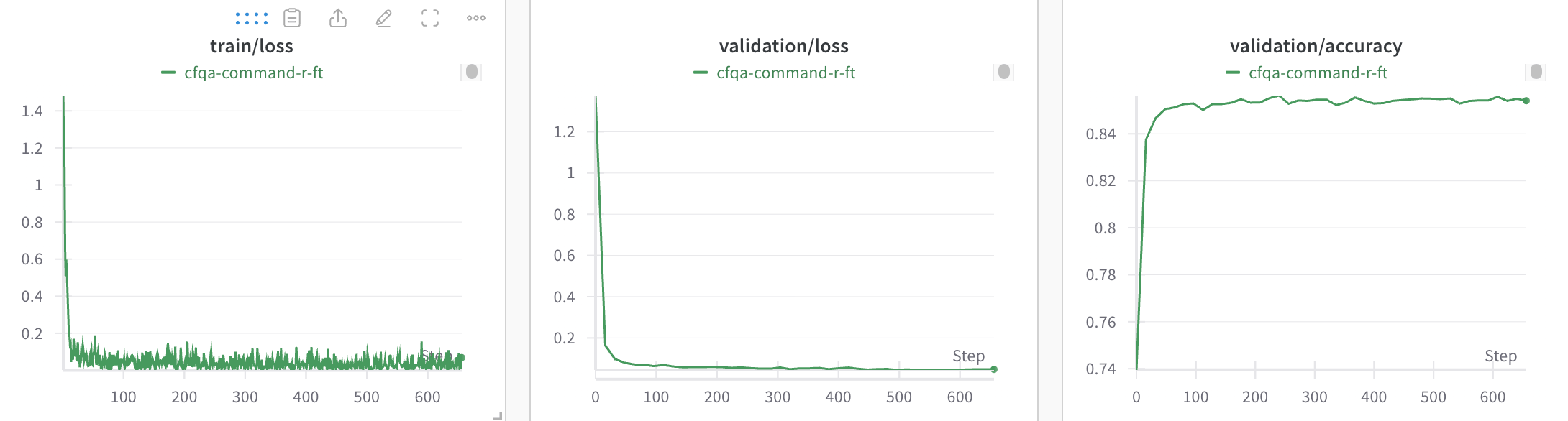 run이 시작되면 Cohere 파인튜닝 작업이 메트릭을 W\&B에 실시간으로 보고하므로, 한곳에서 Runs를 비교하고 트레이닝 진행 상황을 확인할 수 있습니다.
## run 정리
W\&B run은 자동으로 정리됩니다. 작업 유형, 기반 모델, 학습률, 기타 모든 하이퍼파라미터 등 모든 설정 매개변수를 기준으로 필터링하고 정렬할 수 있습니다.
또한 run의 이름을 바꾸고, 메모를 추가하거나, 태그를 만들어 그룹으로 묶을 수 있습니다.
## 리소스
전체 예제는 [Cohere 파인튜닝 예시 노트북](https://github.com/cohere-ai/notebooks/blob/kkt_ft_cookbooks/notebooks/finetuning/convfinqa_finetuning_wandb.ipynb)을 참조하세요.